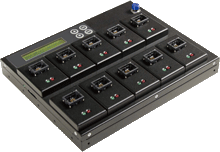
industrial series EMMC210 programmer is high speed flash Memory programmer, it is designed for eMMC memory cards. With exchangeable module and easy operating interface, professional features, it will significantly increase production efficiency.
EMMC210 eMMC programmer will provide copy, compare function. Real testing for transmission speed is up to 6.2GB per minute and does not degrade even when all ports are fully populated. It supports Boot partition, RPMB partition, and user area copy. With special professional log function, the duplicator allows to record tasks processing for each port, including tasks time, results, eMMC card number and other info. Also, provide the best management reports for shipment tracking, analysis capacity, yield, etc.

FEATURES:
1. Super high copying speed - Support transmission speed up to 6.2GB/min for each port.
2. High compatibility - Support to copy Boot partition, RPMB partition, Enhanced Partition and User data area.
3. Quick copy mode:Support format of FAT16/32/64, Linux ext2/3/4, NTFS, and etc.
4. Log management - Log report records all tasks and details for source control and other management.
5. Two copy modes selection: - Support to select Quick Copy, Whole Area.
6. Three profession Erase modes: - Quick Erase, Full Erase, DoD Erase.
7. Individual changeable socket: easy to switch to different size of eMMC socket.
8. Exclusive event log report management records all tasks and details for better production control. port
9. Smart LED indicator shows clear working status and result.
10. High speed bit-by-bit hardware comparison.
EMMC210 eMMC programmer will provide copy, compare function. Real testing for transmission speed is up to 6.2GB per minute and does not degrade even when all ports are fully populated. It supports Boot partition, RPMB partition, and user area copy. With special professional log function, the duplicator allows to record tasks processing for each port, including tasks time, results, eMMC card number and other info. Also, provide the best management reports for shipment tracking, analysis capacity, yield, etc.
FEATURES:
1. Super high copying speed - Support transmission speed up to 6.2GB/min for each port.
2. High compatibility - Support to copy Boot partition, RPMB partition, Enhanced Partition and User data area.
3. Quick copy mode:Support format of FAT16/32/64, Linux ext2/3/4, NTFS, and etc.
4. Log management - Log report records all tasks and details for source control and other management.
5. Two copy modes selection: - Support to select Quick Copy, Whole Area.
6. Three profession Erase modes: - Quick Erase, Full Erase, DoD Erase.
7. Individual changeable socket: easy to switch to different size of eMMC socket.
8. Exclusive event log report management records all tasks and details for better production control. port
9. Smart LED indicator shows clear working status and result.
10. High speed bit-by-bit hardware comparison.
Comments
Post a Comment