
The Easiest Way Fix Face ID (WITHOUT SOLDERING) Not Working with AY A108 Programmer

 The AY A108 Programmer is a great tool for repairing smartphones’ face ID issue with the latest soldering-free method. In this blog, we'll provides an overview of this tool and a step-by-step tutorial on how to use the AY A108 Programmer.


Phonefix offers a wide range of face ID repair tools and solutions such as i2C i6S, JCID JCID Non-removal FPC, Mijing ZH01, Qianli DZ03,etc. Today, let's focus on how to use the A108 Box.

What is the AY A108 Programmer?
The AY A108 Programmer is a specialized device developed by AY Tech Corporation. It is a professional tool that helps phone technicians easily repair smartphone face indentation array without requiring to do a complicated soldering process.
Fix Face ID Not Working with AY A108 Box (WITHOUT SOLDERING)
It is also very fast and convenient as it can be done through a simple wiring connection using common JCID and i2C i6S programmer methods.

How Does It Work?
The AY A108 programmer is designed to use its advanced technology to connect directly with a smartphone’s face indentation array. With the help of the programmer, technicians can bypass the soldering process and do a wiring connection between the face indentation array and the programmer quickly and easily.

After that, the programmer can then send a signal or programming instruction to the array which will then receive the commands and start the reconstruction process of the phone's face identification data.  

How to Use the AY A108 Programmer
Before you start, make sure you have all the necessary components, including the AY A108 programmer, an appropriate wiring connection, and a high-speed USB cable.
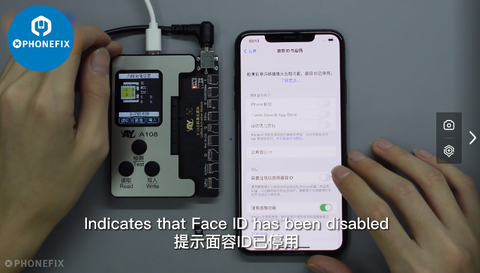
Step 1. Connect the wire to the programmer
Connect one end of the wire to the AY A108 programmer, and then connect the other end of the wire to the face indentation array.

Step 2. Connect the USB cable and turn on the AY A108 programmer
Connect one end of the USB cable to the AY A108 programmer, and then connect the other end of the cable to the computer. Turn on the AY A108 programmer.

Step 3. Install the driver software
Download and install the AY A108 driver software from the AY Tech Corporation website.
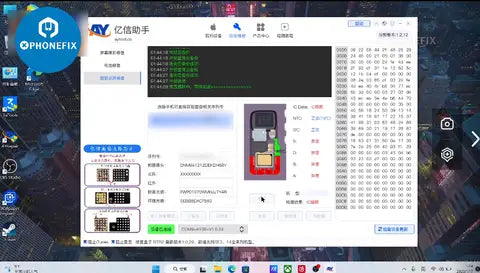
Fix Face ID Not Working with AY A108 Box (WITHOUT SOLDERING)
Step 4. Start the programming process
Execute the program in the driver software, and select “Repair Face Identification” from the menu. Then, follow the on-screen instructions to begin the programming process.

Step 5.
 Check the status of the repair
After successful repairs are completed, the program will prompt you to check the status of the repair. The status of the repair can be determined in the “Status” section in the program.

Step 6. Complete the repair
When the repair is completed, the program will prompt you to finalize the repair. Simply follow the on-screen instructions and the repair will be finalized.

The AY A108 Programmer offering by Phonefix is a perfect tool for repairing smartphones face ID without doing any complicated soldering processes. All repairs are done quickly and easily using the programmer.
Final Thoughts
The instructions above should help you make the most out of your AY A108 Programmer. So, if you’re looking for an easy and effective way to repair your phone’s face indentation array, the AY A108 programmer is definitely the way to go.

Comments

Popular posts from this blog

User Manual: JC V1 Programmer to fix iPhone light sensor/vibrator

As we know, the light sensor and vibrator is very important for iPhone screen. If you want to replace the iPhone screen, you also need to transfer the original screen data to the new iPhone screen(iPhone 8 to iPhone Xs Max),so you can make sure the new iPhone screen will work fine. Here is a  JC V1 programmer  to fix iPhone light sensor and vibrator problem (for iPhone 7- iPhone Xs Max), it also can repair iPhone baseband eeprom IC or iPhone logic eeprom IC problem. The JC V1 Programmer comes with 24-inch HD display screen, three-color LED indicator light, two small connecting seats (for connecting function panel) , two buttons and one function panel (including light sensor/touch connector, baseband function connector, vibration connector) It support 2 languages (Chinese/English) and three lines of code (read/write/burn/save), the function panel can be changed, the software can automatically update What’s the functions? - Repair iPhone Light sensor/ true ...

How to install K-TAG 7.003 KTM100 K-Suite 2.13 software

China Clone KTAG 7.003 firmware has newly launched, New2.13 KTM100 software is the replacement of 2.13 K-Suite which brings brand-new interface and makes easier operation. Here, vipprogrammer.com share the installation guide of K-TAG 7.003 K-Suite 2.13 software, this step-by-step instruction guide will help you. Software: KTM100 V2.13 (better than Ksuite software) Firmware: V7.003 Language:  English, Italian, Portuguese NOTE: KTM100 software can only be work with KTAG firmware V7.003 New KATG KTM100 V2.13 Firmware 7.003 new added feature: 1) New add BMW F chassis petrol and Mercedes-Benz W222 models 2) Software is much easier to use and is very stable. After you connect the car, just choose the large type, KTM100 will recognize the ECU detailed type via ID automatically. Disable both local network and wireless connection (Very important!!!) 1) Install KTAG KTM100 V2.13 setup Open KTM100 setup in the CD software on My computer Open KTM100 file, then open KTM100 English file...

Install instructions for 2015.R1 autocom CDP Diagnosis software

2015.R1 autocom cdp software is available, 2015.1 autocom cdp software need to be activated by keygen, here, we share Install instructions for 2015.R1 autocom cdp software, help you how to crack autocom cdp software on you pc Tips: 1.) TURN OFF your internet connection! 2.) Shutdown antivirus software! The tutorial of Installing 2015.R1 autocom cdp Step 1: download autocom cdp software or insert the dvd to your pc. Step 2: pls download upgrade file for 2015.1 autocom cdp software, then copy all file and folder replace to autocom cdp(new vci) install Folder. Instructions for 2014.R1 autocom cdp Diagnosis software Step 3: Run autocom cdp software agian, the Activation menu will be showed, PLS DO IT by activation guide for 2013.R3 autocom cdp software. Step 4: Choose - click “YES” button to save autocom cdp FileActivation file, send this FileActivation.xml file to us (PLS DON’T USING 2013.3 Autocom delphi KEYGEN GET Activation FILE). Instructions for 2015.R1 autocom cdp Diagnosis softwar...