Unbind iphone Accessorries with Shalou Tool: No Equipment, No Disassembly

 The Shalou Tool offers a free solution for verifying devices, specifically by simplifying the process of unbinding accessories. No additional equipment, disassembly, or transportation required hassles By downloading the Shalou Verification Tool software to your computer, you can effortlessly unbind accessories following the PHONEFIX guide. https://www.diyfixtool.com/

Step-by-Step Guide

  1. Launch the Shalou Verification Tool platform and go to the "Professional Flashing" section.
  2. Click on the unbinding accessories icon and select the firmware version you want to download. Don't forget to back up your data before proceeding.
  3. Wait for the progress bar to show the unbinding process in action. Make sure your device stays connected throughout. If unbinding fails, simply repeat the steps.
  4. Look for a small green dot next to the unbinding components icon. Your phone will automatically restart and display a progress bar. Let the unbinding progress bar complete.
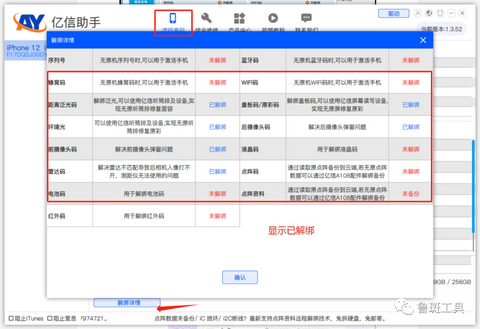
  5. Once the unbinding is complete, the progress bar will turn pale green, indicating a successful unbinding.
  6. the corresponding platform on your computer, connect the device, and verify that it is unbound and ready for the next steps.
Luban Tools
i2C Platform
JC-ID Software Repair Assistant Platform
AY Yixun Assistant
WL Software Assistant Platform

Troubleshooting Unbinding Failures

If you encounter any issues during the unbinding process, consider the following:
  1. Unbinding failures may occur if there are missing or damaged components on the phone.
  2. For iPhone 13-14 series devices, make sure to install the iPhone 13-14 Display Screen and sensor ribbon cables before attempting to unbind. For iPhone 14 series devices, wireless charging must be installed.
  3. If unbinding fails, try repeating the process multiple times to increase the chances of success.
Follow these steps using the free Shalou Tool to effortlessly unbind accessories without the need for extra equipment or device disassembly.

Beside, the Shalou verification tool, the globally innovative cell phone verification software with unique functions. It also features powerful and professional flashing capabilities, as well as device color verification, underlying fingerprint code inspection, and current fingerprint code viewing functionalities.

Enjoy the convenience and simplicity of the Shalou Tool's powerful feature! PHONEFIX offers a wide range of repair tools and services to assist you in fixing your iPhone and other mobile devices. Visit our website DIYFIXTOOL or contact us for more information!

Comments

Popular posts from this blog

User Manual: JC V1 Programmer to fix iPhone light sensor/vibrator

As we know, the light sensor and vibrator is very important for iPhone screen. If you want to replace the iPhone screen, you also need to transfer the original screen data to the new iPhone screen(iPhone 8 to iPhone Xs Max),so you can make sure the new iPhone screen will work fine. Here is a  JC V1 programmer  to fix iPhone light sensor and vibrator problem (for iPhone 7- iPhone Xs Max), it also can repair iPhone baseband eeprom IC or iPhone logic eeprom IC problem. The JC V1 Programmer comes with 24-inch HD display screen, three-color LED indicator light, two small connecting seats (for connecting function panel) , two buttons and one function panel (including light sensor/touch connector, baseband function connector, vibration connector) It support 2 languages (Chinese/English) and three lines of code (read/write/burn/save), the function panel can be changed, the software can automatically update What’s the functions? - Repair iPhone Light sensor/ true ...

How to install K-TAG 7.003 KTM100 K-Suite 2.13 software

China Clone KTAG 7.003 firmware has newly launched, New2.13 KTM100 software is the replacement of 2.13 K-Suite which brings brand-new interface and makes easier operation. Here, vipprogrammer.com share the installation guide of K-TAG 7.003 K-Suite 2.13 software, this step-by-step instruction guide will help you. Software: KTM100 V2.13 (better than Ksuite software) Firmware: V7.003 Language:  English, Italian, Portuguese NOTE: KTM100 software can only be work with KTAG firmware V7.003 New KATG KTM100 V2.13 Firmware 7.003 new added feature: 1) New add BMW F chassis petrol and Mercedes-Benz W222 models 2) Software is much easier to use and is very stable. After you connect the car, just choose the large type, KTM100 will recognize the ECU detailed type via ID automatically. Disable both local network and wireless connection (Very important!!!) 1) Install KTAG KTM100 V2.13 setup Open KTM100 setup in the CD software on My computer Open KTM100 file, then open KTM100 English file...

Install instructions for 2015.R1 autocom CDP Diagnosis software

2015.R1 autocom cdp software is available, 2015.1 autocom cdp software need to be activated by keygen, here, we share Install instructions for 2015.R1 autocom cdp software, help you how to crack autocom cdp software on you pc Tips: 1.) TURN OFF your internet connection! 2.) Shutdown antivirus software! The tutorial of Installing 2015.R1 autocom cdp Step 1: download autocom cdp software or insert the dvd to your pc. Step 2: pls download upgrade file for 2015.1 autocom cdp software, then copy all file and folder replace to autocom cdp(new vci) install Folder. Instructions for 2014.R1 autocom cdp Diagnosis software Step 3: Run autocom cdp software agian, the Activation menu will be showed, PLS DO IT by activation guide for 2013.R3 autocom cdp software. Step 4: Choose - click “YES” button to save autocom cdp FileActivation file, send this FileActivation.xml file to us (PLS DON’T USING 2013.3 Autocom delphi KEYGEN GET Activation FILE). Instructions for 2015.R1 autocom cdp Diagnosis softwar...