
Apple Watches are now a hot fashion due to many superior features that conventional digital watches do not have. As these smartwatches are progressing more and more, different software and hardware devices can fix and avoid any unwelcome issues. Apple Watch Restore Tool AWRT Adapter six in one iBus tool can easily unlock and restore your Apple Watches of the series 1, 2, 3, 4, 5, and 6.
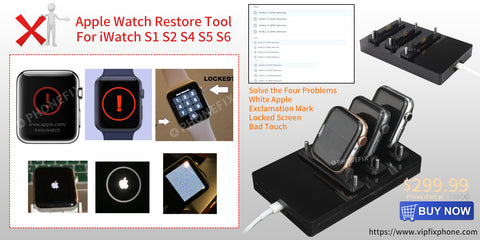
We have come up with a must-to-have solution if you are fond of wearing Apple Watches. More often than not, you struggle with unlocking or restoring your Apple watches. This issue is not as arduous to be rectified as you might be thinking it is. But, there are as many solutions as many problems. We got you covered with what brought you here.
How to restore & unlock the apple watch series 1, 2, 3, 4, 5, and 6?
We now proceed to explain how to unlock and restore the Apple Watch S1, S2, S3, S4, S5, and S6, which are 42 mm/38 mm with the help of Apple Watch Restore Tool six in one iBus tools which come with an Unsigned IPSW firmware service software, that too, free of any cost.
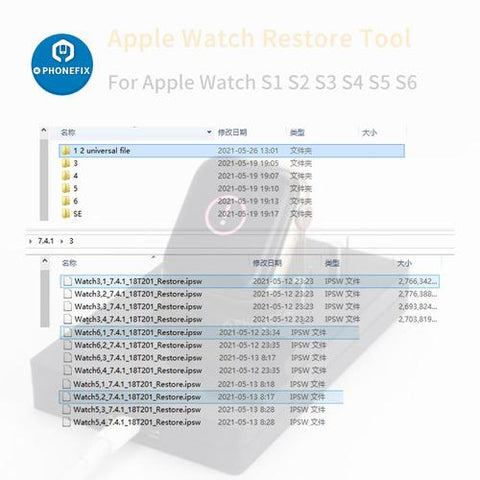
Restoring the Apple Watch is not as tough a task as it seems. You connect the iBus to the maintenance port present on the Apple iWatch and connect a universal serial bus cable from a Mac to the iBus. From this point onwards, the procedure is just about opening iTunes and restoring the software in question as you would do with an IOS device.

Anyhow, if you did not get how this whole thing works, you can watch our video about how to restore & unlock apple watch S 1, 2, 3, 4, 5, and 6, 42/38mm using Apple Watch Restore Tool 6 IN 1 iBus tools here: https://www.youtube.com/watch?v=qB4AUOiWy_Y
Oversee the video to learn step by step how to restore or unlock your Apple iWatch of the series 1, 2, 3, 4, 5, and 6 42 mm and 38 mm with the help of this six-in-one tool.
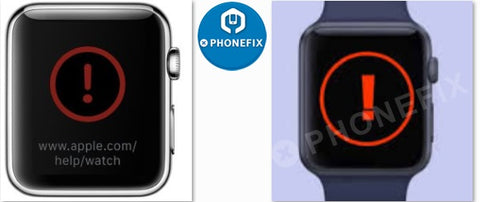
With an iWatch restore tool, you can restore and repair the red exclamation mark and "!" error in the Apple iWatches of the series S1, S2, S3, S4, S5, and S6. So, this restore tool works wonders for removing these errors as well. If your Apple iWatch shows any red-colored exclamation mark or "!" following any software update, you can quickly rectify the problem AWRT iBus tool that ends the trouble of contacting the Apple support and service help deal with the issue. Opt for this wonderful tool, and you are all good to go.
You can also restore & reflash your Apple Watch by using six in one iBUS S1, 2, 3, 4, 5, and 6 Apple Watch Restore Tool by seeking help from our video on YouTube by following the link https://www.youtube.com/watch?v=wMqyltuA3mo . Following this video carefully will get most of your queries answered.
Key Features of AWRT
The most promising features of the Apple Watch Restore Tool are as follows:
• Restore upgrade and repair system
• Works equally well for all S1 S2 S3 S4, S5 and S6
So, unlike many other devices limited to only one series of Apple watches, this unique Apple Watch Restore Tool works for the six series as mentioned above of watches. So, buy it once and use it for your comprehensive watch collection without worrying about buying exclusive solutions to all of these watches separately.
Apple Watch iCloud Bypass Restore Tool, AWRT Adapter third Gen, works well for the iWatch 42mm 38mm S1, S2, S3, S4, S5, and S6 all. This AWRT iWatch restores tool is the best for apple watch upgrade/restore and repair software. The features of AWRT are more or less the same as that of iBus. These features are described below:
- AWRT Adapter for S2 S3 – 42mm 38mm
- AWRT Adapter for S1-42mm 38mm
- Apple Watch Restore Tool adapter for the watch series S1, S2, S3, S4, S5, and S6.
Why this Apple Watch Restore Tool?
Apple Watch Restore Tool is not the solution to only one problem but fixes several issues that Apple iWatch users struggle to find the solutions for.
There are many reasons to be counted that justify the price you spend on an AWRT adapter. One of the main features of this new adapter is that it is smaller in size than the previous versions, but with improved power functions, indeed the best combination you could ask for!
This incredible device has an inbuilt original restore adapter for the apple watch of the series S1, S2, S3, S4, S5, and S6. You can use it to fix Apple Watch's lousy touch, White Apple logos, get stuck on screen, restore, exclamation point, and many other failures as well.

The most promising quality of this tool is that it is not workable for only one type of Apple Watch but unlocks and restores the iWatches of Series 1, 2, 3, 4, 5, and 6 42 mm and 38 mm. So, you can call it a six-in-one product.
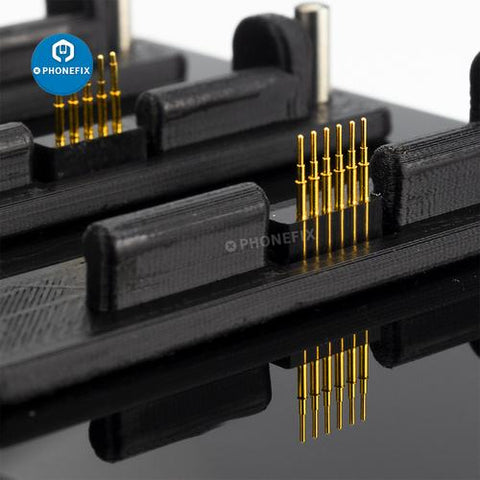
In addition, the newly launched Apple Watch Restore Tool adapter comes in the market with three different probe pins. Therefore, you need not replace the restore adapter model.
These incredible features of the AWRT iBus tool bear witness to how you can quickly restore and unlock your Apple iWatches from the series 1, 2, 3, 4, 5, and 6 42 mm and 38 mm. So, buying this single product removes many of your worries related to the Apple Watches. So, when getting the best solution for a reasonable price, why search for any other option?
So, you should preferably go for one single option that works for multiple series of Apple iWatches rather than wasting your energy and hard-earned money on buying a separate one for every series of the watch. And Apple Watch IPSW File(Firmware) of iWatch S1-S6 for AWRT adapter restore tool can be used together.
Just ensure that you buy the product from a reliable and trustworthy brand so that you don't have to face issues regarding the quality and features of the product. Happy buying!
We have come up with a must-to-have solution if you are fond of wearing Apple Watches. More often than not, you struggle with unlocking or restoring your Apple watches. This issue is not as arduous to be rectified as you might be thinking it is. But, there are as many solutions as many problems. We got you covered with what brought you here.
How to restore & unlock the apple watch series 1, 2, 3, 4, 5, and 6?
We now proceed to explain how to unlock and restore the Apple Watch S1, S2, S3, S4, S5, and S6, which are 42 mm/38 mm with the help of Apple Watch Restore Tool six in one iBus tools which come with an Unsigned IPSW firmware service software, that too, free of any cost.
Restoring the Apple Watch is not as tough a task as it seems. You connect the iBus to the maintenance port present on the Apple iWatch and connect a universal serial bus cable from a Mac to the iBus. From this point onwards, the procedure is just about opening iTunes and restoring the software in question as you would do with an IOS device.
Anyhow, if you did not get how this whole thing works, you can watch our video about how to restore & unlock apple watch S 1, 2, 3, 4, 5, and 6, 42/38mm using Apple Watch Restore Tool 6 IN 1 iBus tools here: https://www.youtube.com/watch?v=qB4AUOiWy_Y
Oversee the video to learn step by step how to restore or unlock your Apple iWatch of the series 1, 2, 3, 4, 5, and 6 42 mm and 38 mm with the help of this six-in-one tool.
With an iWatch restore tool, you can restore and repair the red exclamation mark and "!" error in the Apple iWatches of the series S1, S2, S3, S4, S5, and S6. So, this restore tool works wonders for removing these errors as well. If your Apple iWatch shows any red-colored exclamation mark or "!" following any software update, you can quickly rectify the problem AWRT iBus tool that ends the trouble of contacting the Apple support and service help deal with the issue. Opt for this wonderful tool, and you are all good to go.
You can also restore & reflash your Apple Watch by using six in one iBUS S1, 2, 3, 4, 5, and 6 Apple Watch Restore Tool by seeking help from our video on YouTube by following the link https://www.youtube.com/watch?v=wMqyltuA3mo . Following this video carefully will get most of your queries answered.
Key Features of AWRT
The most promising features of the Apple Watch Restore Tool are as follows:
• Restore upgrade and repair system
• Works equally well for all S1 S2 S3 S4, S5 and S6
So, unlike many other devices limited to only one series of Apple watches, this unique Apple Watch Restore Tool works for the six series as mentioned above of watches. So, buy it once and use it for your comprehensive watch collection without worrying about buying exclusive solutions to all of these watches separately.
Apple Watch iCloud Bypass Restore Tool, AWRT Adapter third Gen, works well for the iWatch 42mm 38mm S1, S2, S3, S4, S5, and S6 all. This AWRT iWatch restores tool is the best for apple watch upgrade/restore and repair software. The features of AWRT are more or less the same as that of iBus. These features are described below:
- AWRT Adapter for S2 S3 – 42mm 38mm
- AWRT Adapter for S1-42mm 38mm
- Apple Watch Restore Tool adapter for the watch series S1, S2, S3, S4, S5, and S6.
Why this Apple Watch Restore Tool?
Apple Watch Restore Tool is not the solution to only one problem but fixes several issues that Apple iWatch users struggle to find the solutions for.
There are many reasons to be counted that justify the price you spend on an AWRT adapter. One of the main features of this new adapter is that it is smaller in size than the previous versions, but with improved power functions, indeed the best combination you could ask for!
This incredible device has an inbuilt original restore adapter for the apple watch of the series S1, S2, S3, S4, S5, and S6. You can use it to fix Apple Watch's lousy touch, White Apple logos, get stuck on screen, restore, exclamation point, and many other failures as well.
The most promising quality of this tool is that it is not workable for only one type of Apple Watch but unlocks and restores the iWatches of Series 1, 2, 3, 4, 5, and 6 42 mm and 38 mm. So, you can call it a six-in-one product.
In addition, the newly launched Apple Watch Restore Tool adapter comes in the market with three different probe pins. Therefore, you need not replace the restore adapter model.
These incredible features of the AWRT iBus tool bear witness to how you can quickly restore and unlock your Apple iWatches from the series 1, 2, 3, 4, 5, and 6 42 mm and 38 mm. So, buying this single product removes many of your worries related to the Apple Watches. So, when getting the best solution for a reasonable price, why search for any other option?
So, you should preferably go for one single option that works for multiple series of Apple iWatches rather than wasting your energy and hard-earned money on buying a separate one for every series of the watch. And Apple Watch IPSW File(Firmware) of iWatch S1-S6 for AWRT adapter restore tool can be used together.
Just ensure that you buy the product from a reliable and trustworthy brand so that you don't have to face issues regarding the quality and features of the product. Happy buying!
Comments
Post a Comment