Unbind iphone Accessorries with Shalou Tool: No Equipment, No Disassembly

 The Shalou Tool offers a free solution for verifying devices, specifically by simplifying the process of unbinding accessories. No additional equipment, disassembly, or transportation required hassles By downloading the Shalou Verification Tool software to your computer, you can effortlessly unbind accessories following the PHONEFIX guide. https://www.diyfixtool.com/

Step-by-Step Guide

  1. Launch the Shalou Verification Tool platform and go to the "Professional Flashing" section.
  2. Click on the unbinding accessories icon and select the firmware version you want to download. Don't forget to back up your data before proceeding.
  3. Wait for the progress bar to show the unbinding process in action. Make sure your device stays connected throughout. If unbinding fails, simply repeat the steps.
  4. Look for a small green dot next to the unbinding components icon. Your phone will automatically restart and display a progress bar. Let the unbinding progress bar complete.
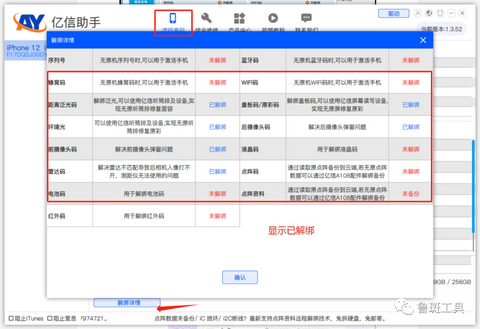
  5. Once the unbinding is complete, the progress bar will turn pale green, indicating a successful unbinding.
  6. the corresponding platform on your computer, connect the device, and verify that it is unbound and ready for the next steps.
Luban Tools
i2C Platform
JC-ID Software Repair Assistant Platform
AY Yixun Assistant
WL Software Assistant Platform

Troubleshooting Unbinding Failures

If you encounter any issues during the unbinding process, consider the following:
  1. Unbinding failures may occur if there are missing or damaged components on the phone.
  2. For iPhone 13-14 series devices, make sure to install the iPhone 13-14 Display Screen and sensor ribbon cables before attempting to unbind. For iPhone 14 series devices, wireless charging must be installed.
  3. If unbinding fails, try repeating the process multiple times to increase the chances of success.
Follow these steps using the free Shalou Tool to effortlessly unbind accessories without the need for extra equipment or device disassembly.

Beside, the Shalou verification tool, the globally innovative cell phone verification software with unique functions. It also features powerful and professional flashing capabilities, as well as device color verification, underlying fingerprint code inspection, and current fingerprint code viewing functionalities.

Enjoy the convenience and simplicity of the Shalou Tool's powerful feature! PHONEFIX offers a wide range of repair tools and services to assist you in fixing your iPhone and other mobile devices. Visit our website DIYFIXTOOL or contact us for more information!

Comments

Popular posts from this blog

Complete Guide to Replacing Your iPhone Battery at Home

  Has your iPhone battery started showing the dreaded signs of age, like frequent charging, rapid draining, or even an untimely shutdown? Are you considering a battery replacement but feeling deterred by the potential cost or hassle of a trip to the Apple Store? Don't worry; with the right guidance, you can replace your iPhone battery at home quickly and safely, sparing your wallet and ensuring a future of longer charge cycles for your beloved device. Whether you have the latest model or an older version, we'll walk you through the process step by step. But before we get into the nitty-gritty, here's why a battery replacement might be in your best interest. Why You Should Replace Your iPhone Battery The lithium-ion batteries in our smartphones are not immortal. They degrade over time due to a variety of factors, such as age, temperature, and the number of charge cycles. Replacing an old battery can provide several benefits: Improved Performance: A new battery can result ...

User Manual: JC V1 Programmer to fix iPhone light sensor/vibrator

As we know, the light sensor and vibrator is very important for iPhone screen. If you want to replace the iPhone screen, you also need to transfer the original screen data to the new iPhone screen(iPhone 8 to iPhone Xs Max),so you can make sure the new iPhone screen will work fine. Here is a  JC V1 programmer  to fix iPhone light sensor and vibrator problem (for iPhone 7- iPhone Xs Max), it also can repair iPhone baseband eeprom IC or iPhone logic eeprom IC problem. The JC V1 Programmer comes with 24-inch HD display screen, three-color LED indicator light, two small connecting seats (for connecting function panel) , two buttons and one function panel (including light sensor/touch connector, baseband function connector, vibration connector) It support 2 languages (Chinese/English) and three lines of code (read/write/burn/save), the function panel can be changed, the software can automatically update What’s the functions? - Repair iPhone Light sensor/ true ...

Here: JC P11 iPhone Nand Test Fixture Specification Details

JC P11 iPhone Nand test fixture is on sale now, some users still confused for it, what's credit points for JC P11? Why it's cheap? As we know, JC P11 BGA110 programmer is the latest programmer for iPhone   iPhone XS Max,XS, X, 8P, 8  and iPhone 11 Pro max/pro/11, which is made by JCID factory.  Here are some  specification details for JC P11 programmer . 1. Main Functions. - Support to modify and write BGA110 NAND SYSCFG data (NAND Flash underlying data, such as SN/BT/WIFI and others); Unbind WIFI. - It doesn't require restoring the firmware for brand-new Nand flash, the SYSCFG data can be written directly. - Repair the Error 35 during firmware restoring for BGA110 NAND - Repair the DATA Error for BGA110 NAND - Support iPhone 8/8P/X/XS/XS Max currently, free software upgrade to support 11-11Pro Max in the future - Initiate the network charging mode, can purchase the points according to the demand, which greatly saves the equipmen...